- The classes and structs specified in the Lua API documentation still use their unreal prefix for classes and structs in some places (ARivalsGameplayEntity instead of just RivalsGameplayEntity), but to reference those types in the lua code itself (except for enums), you still use the name without the prefix (RivalsGamplayEntity).
- To get around this, you just have to open the character definition asset for the character you wish to test in the editor before hitting play.
- For functions that take a const interface as an argument (notably const RivalsDamageInterface*), an issue can occur where the reference to that object does not get passed in correctly.
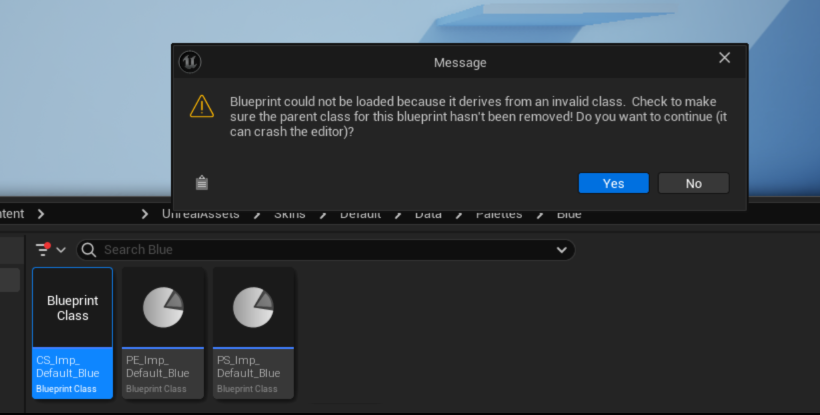
Invalid Class Error
If one of your blueprints can not be loaded because it derives from an invalid class, the reference to it’s parent may be broken. You may need re parent the blueprint by opening it and selecting File-Reparent and navigating to the parent class or asset in the project.
Mod Naming
Mods require a name with at least 3 Characters. If you try to name your character with less than 3 characters, empty folders will be generated where you mod content should be and you will not be able to proceed. Delete the numbered folder and try again with a minimum of 3 characters.
FAQs
Why is my character mesh not showing up in game?
If you have imported character mesh and you cannot see it when playtesting, ensure that it is assigned to the character mesh component in your Rivals Character Renderer located in your Unreal assets/Skins/Default folder.
Why is my Overhead UI clipping into my character?
Overhead UI is automatically offset by the ECB or Environmental Collision Box, the ECB is determined by your Hurtbox asset, you are likely missing hurtbox colliders.
Why doesn’t my character/item etc. have shadows?
You must have a shadow caster physics asset properly configured and assigned to your skeletal mesh. If this is done and you still do not have shadows, your skeleton may have scale on one or more joints (Scale values other than 1) which can interfere with proper capsule shadow casting. Eliminate scale in Blender by adjusting character scale, applying scale transforms and exporting your models and animation with proper settings.
Why is my model Grey in Unreal (Where are my textures?)
You must create and assign your own Material Instances to your mesh.
You must also import your textures and assign them to your Material Instances
How do I add Toon Shading/ How do I add outlines
Toon shading and outlines are available by creating and assigning Material Instances of the MAT_Cha_Standard.
Why do my character outlines have gaps?
Gaps in your outlines can be caused by faceted shading on the geometry. Make sure that your geometry normals are completely smooth shaded in blender and don’t contain any custom geometry normal data.
How do I bring my materials in Blender into Unreal
Unfortunately you can’t, all materials must be authored in Unreal.
How do I change import settings when I Reimport a mesh?
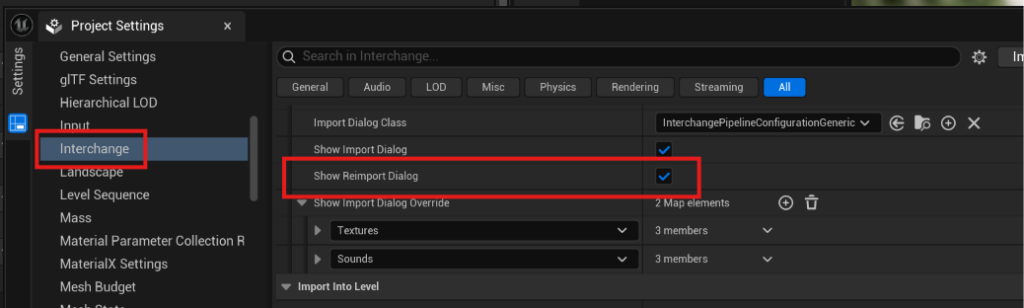
If the import options do not appear when re importing a mesh, go to editor Preferences/Engine/Interchange and enable Show Reimport Dialog